WANTWARE IN ACTION

Inside the Jewel Aptiv

More than a browser—Jewel demonstrates how Aptivs replace brittle stacks with
adaptive meaning-based execution.

From boot-up to trust-by-design, discover what makes Jewel a different class of software.


What Makes Jewel a New Type of Browser

Jewel is a wantware-powered Aptiv used to browse, analyze, and extract information from webpages using HTML5, JavaScript, CSS, and WebGL via the DOM. Simply put, Jewel lets people create, interact with, and control web experiences—without being a coder. It extends the ubiquitous features of web browsers to the desktop and beyond. The affect is a truly unified experience across all computing machines.

Everywhere Essence runs, Aptivs run without modification. Aptivs bind and fold, like proteins that have the fundamental building blocks needed to act as an inherently interoperable bitstream—the IANA registered wantverse format, not a simple binary blob containing code and data. Jewel benefits from platform independence, real-time optimization, and trust-by-design.

Inside Jewel Architecture

Jewel demonstrates how an Aptiv binds to the platform at boot, composes behavior at runtime, and enforces trust continuously. This section outlines the execution flow and the major subsystems involved.

Boot and Platform Binding

Launch

Bootup and Spawn initializes via OS or UEFI and creates initial processes and threads with a target of near instant startup.

Resource profiling

Resource Accessor inventories CPUs, GPUs, DSPs, buses, memory, and device capabilities, establishing pooled resources for runtime scheduling.

Session and identity

User Setup restores the last session state, style, rules, and history after confirming identity and context.

Baseline trust

Authenticator verifies internal packages and preconditions before higher level execution proceeds.

Runtime Composition Path

At runtime, Jewel composes behavior from Meaning Coordinates and PowerAptivs to generate machine instructions and orchestrate engines such as WebKit or Chromium.

Synergy captures user dialog and maps it to Meaning Coordinates. No NLP pipeline is required. The output is precise intent units suitable for execution planning.
Morpheus—our instruction maker—transforms Meaning Coordinates into machine instructions or emulator paths suitable for available chips at runtime. For GPUs, this commonly targets SPIR-V via Vulkan, while other units may target CPUs, DSPs, codecs, or emulation layers depending on availability and policy.
Jewel binds to WebKit and Chromium as PowerAptivs. Engines can be updated in place without a reboot. DOM interaction, layout, scripting, and WebGL flows are mapped through Engine, Stream, and Edit families to coordinate rendering and interactivity.
Executor and Engine determine task graphs, parallel scheduling, and throttling across pooled resources. Signal Process handles multidimensional math across media and sensor streams. Network and Stream manage data ingress and egress separate from storage semantics.
Referee evaluates outcomes across devices and drivers, arbitrating for quality, timing, and safety constraints. Terminator handles shutdown and black box logging for unrecoverable states.

Continuous Trust Pipeline

PowerAptivs are versioned and can coexist. Multi stage compression and qualified compiling are applied prior to deployment.
Guard provides ciphers, obfuscation, and ledger mechanics. Policies support post quantum readiness and a never trust by default posture.
Runtime verification, code signing, and policy checks are enforced before and during execution. Fail closed behaviors and rollback are supported by design.
Scored outcomes good, neutral, bad inform future planning and optimization, improving both performance and reliability over time.

Execution Sketch

dialog → meaning coordinates → instruction maker
    → cpu path | gpu path (SPIR-V) | emulator path
    → executor + engine scheduling
    → referee arbitration → telemetry → adapt


Jewel + Synergy in Action

Jewel works with Synergy to capture dialog, map it to Meaning Coordinates, and generate machine instructions. Natural language directly drives execution without NLP pipelines or fixed code.

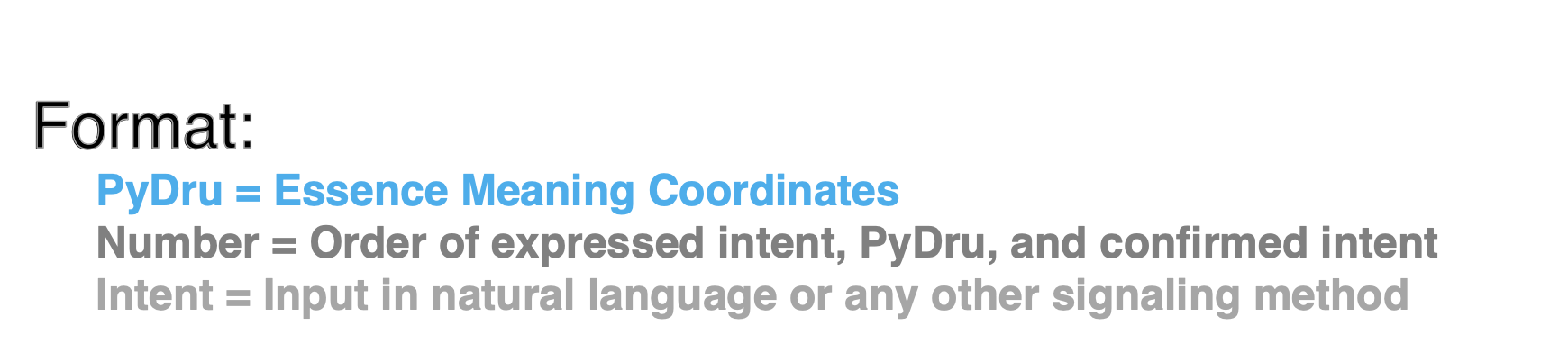
FORMAT

A compact, machine-aligned description of intent ordering and meaning execution.

PyDru
Essence Meaning Coordinates
Execution-aligned semantic units

Number
Order of expressed intent, PyDru, and confirmed intent

— sequencing + confirmation precedence
Intent
Input in natural language or any other signaling method

— dialog, triggers, system signals, sensors
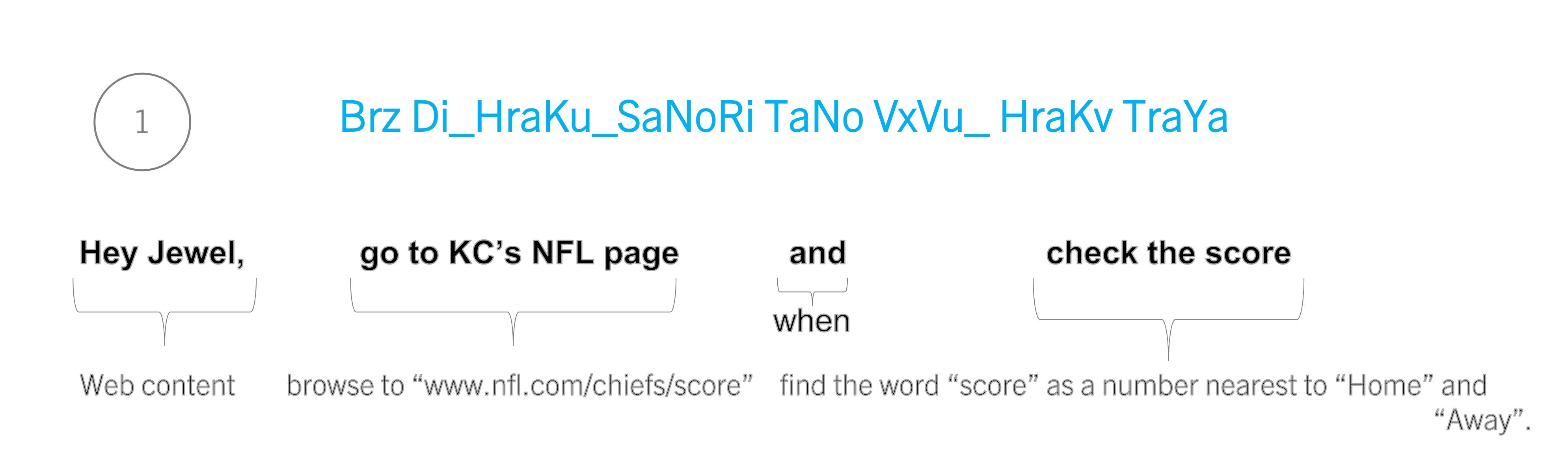
STEP 1 1 Brz Di_HraKu_SaNoRi TaNo VxVu__HraKv TraYa Hey Jewel, Web content go to KC’s NFL page browse to “www.nfl.com/chiefs/score” and when check the score find the word “score” as a number nearest to “Home” and “Away”. Format reference
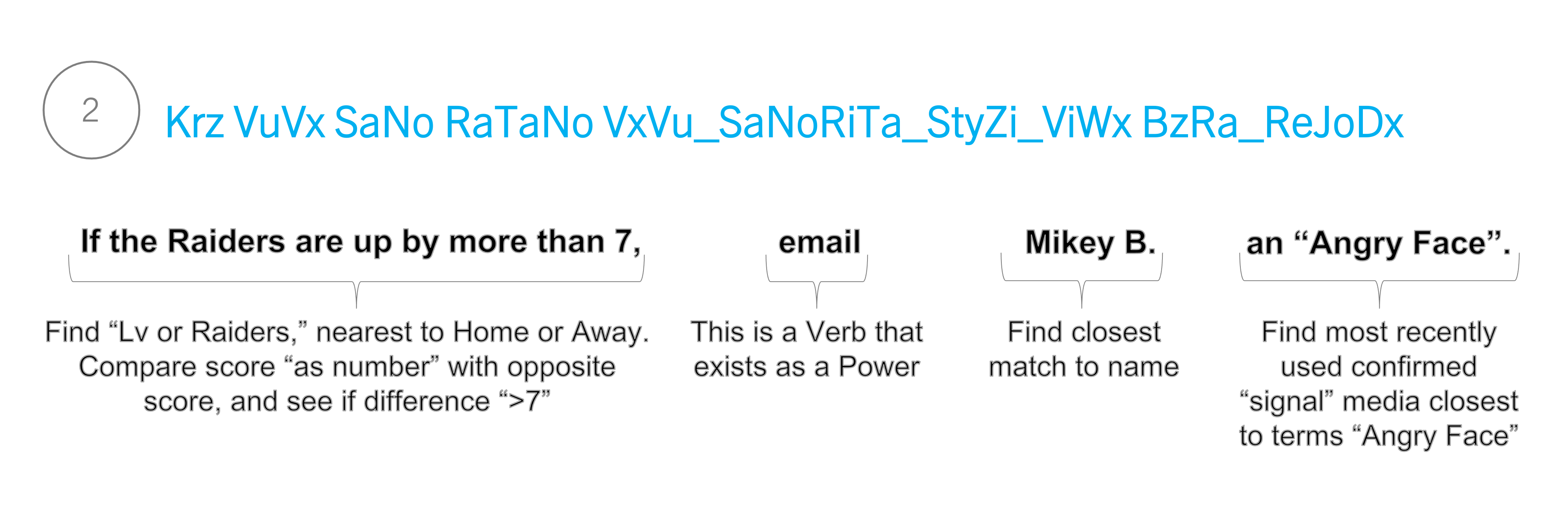
2 Krz VuVx SaNo RaTaNo VxVu_SaNoRiTa_StyZi_ViWx BzRa_ReJoDx If the Raiders are up by more than 7, Find “Lv or Raiders,” nearest to Home or Away. Compare score “as number” with opposite score, and see if difference “>7” email This is a Verb that exists as a Power Mikey B. Find closest match to name an “Angry Face”. Find most recently used confirmed “signal” media closest to terms “Angry Face” Step 2
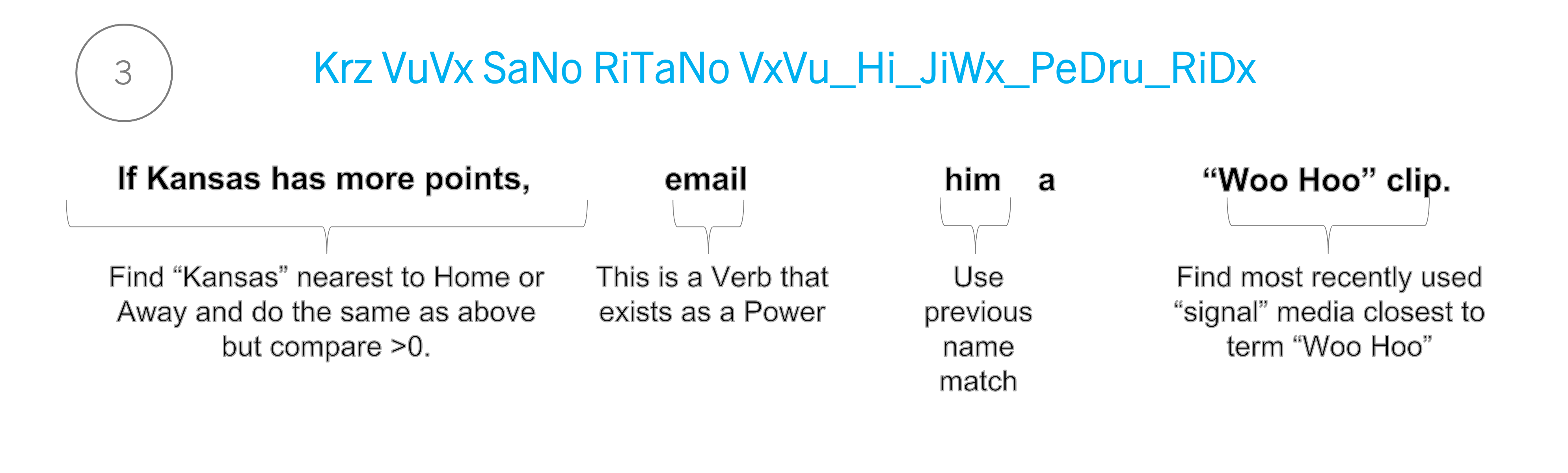
3 Krz VuVx SaNo RiTaNo VxVu_Hi_JiWx_PeDru_RiDx If Kansas has more points, Find “Kansas” nearest to Home or Away and do the same as above but compare >0. email This is a Verb that exists as a Power him Use previous name match a “Woo Hoo” clip. Find most recently used “signal” media closest to term “Woo Hoo” Step 3

STEP 4

Summary

dialog
instructions
execution
result